Enterprise Desktop Cloud Technology Evolution and Selection
1.1 Evolution of Desktop Computing Architectures
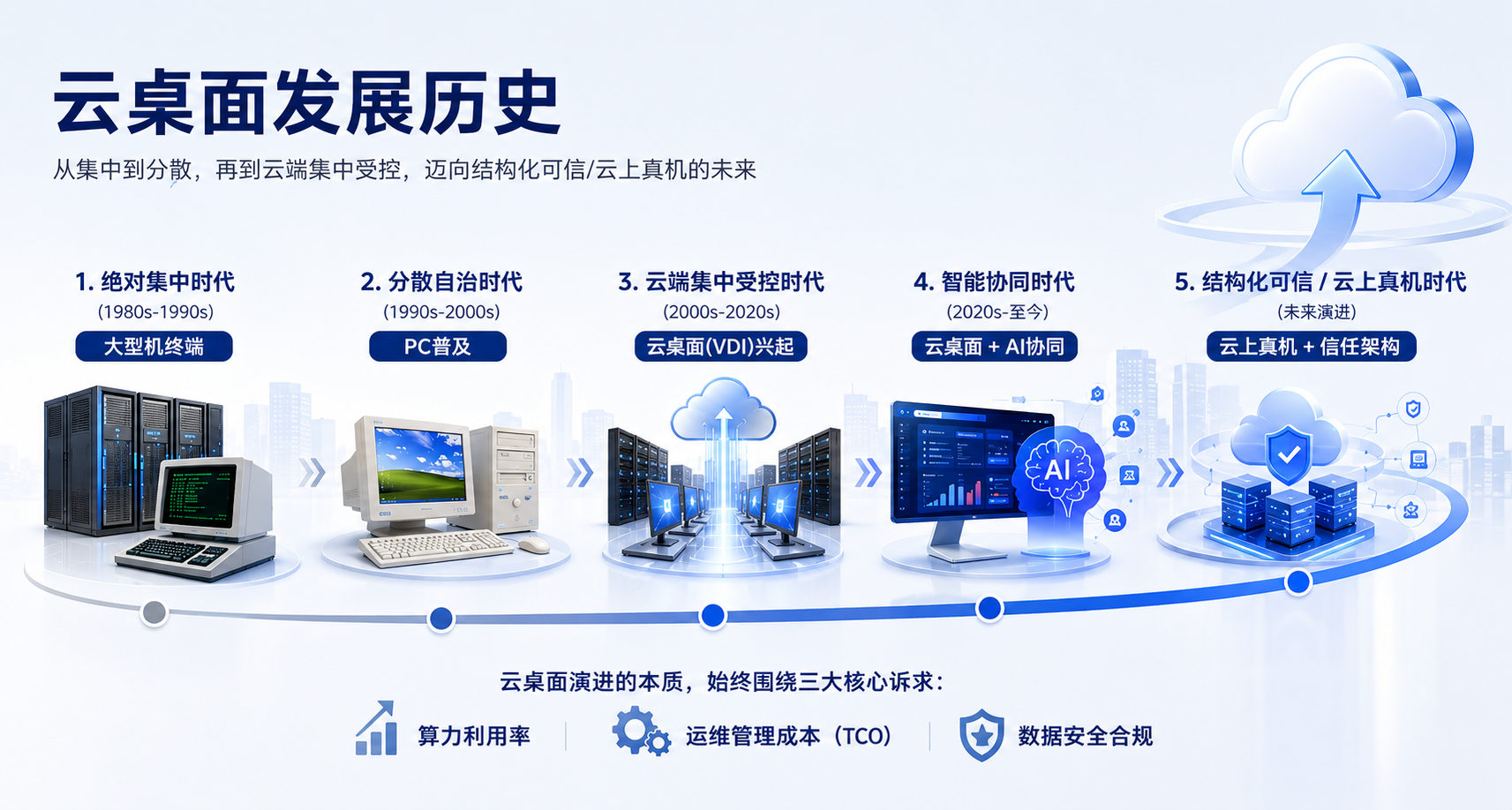
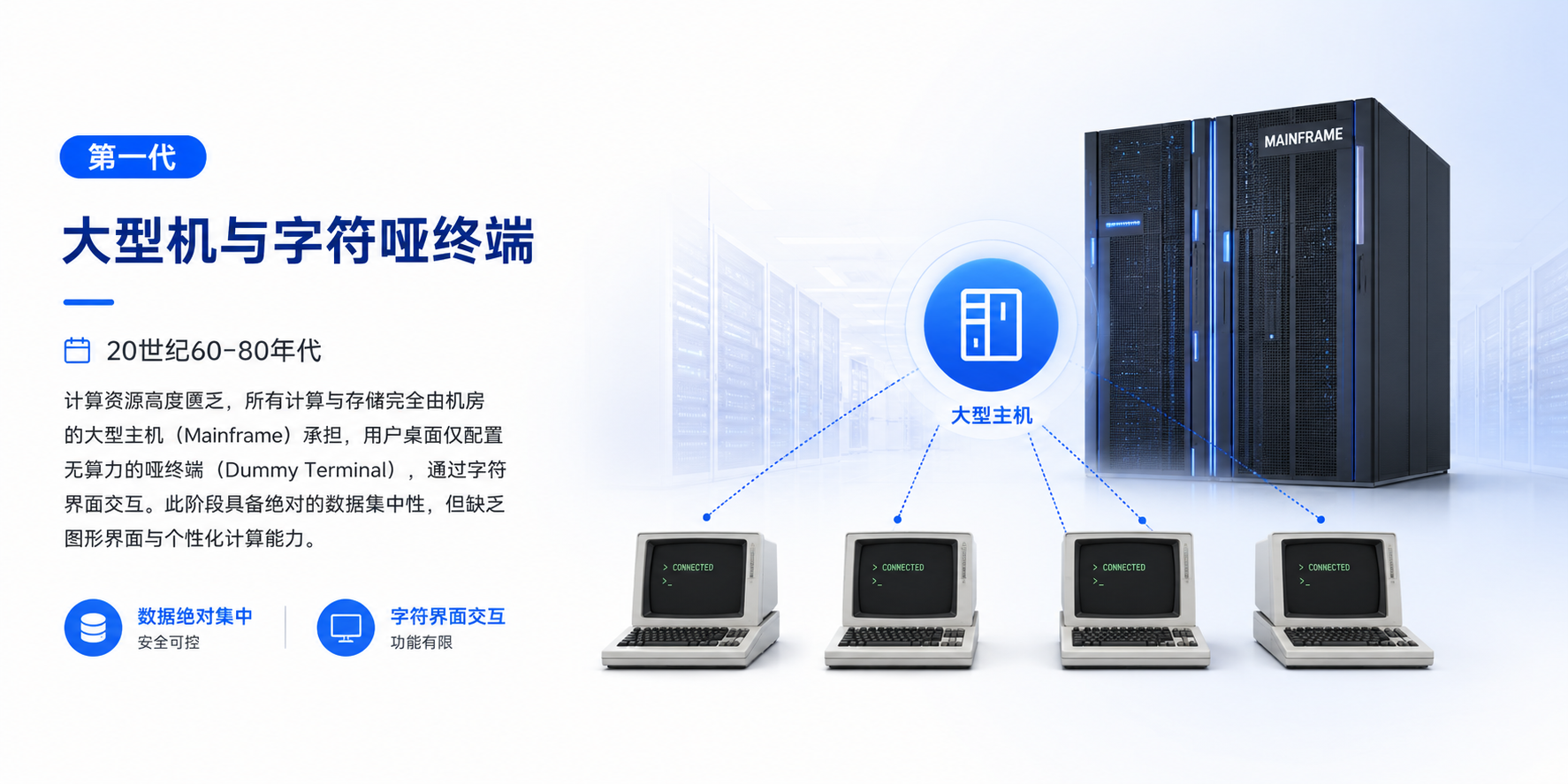
First Generation: Mainframes and Character-Based Dumb Terminals — From the 1960s to the 1980s, computing resources were extremely scarce. All computing and storage were centralized on mainframe computers in the data center, while user desktops were equipped with dumb terminals with virtually no computing power, interacting with the system through a character-based interface. This architecture provided absolute data centralization, but offered limited support for graphical interfaces and personalized computing capabilities.
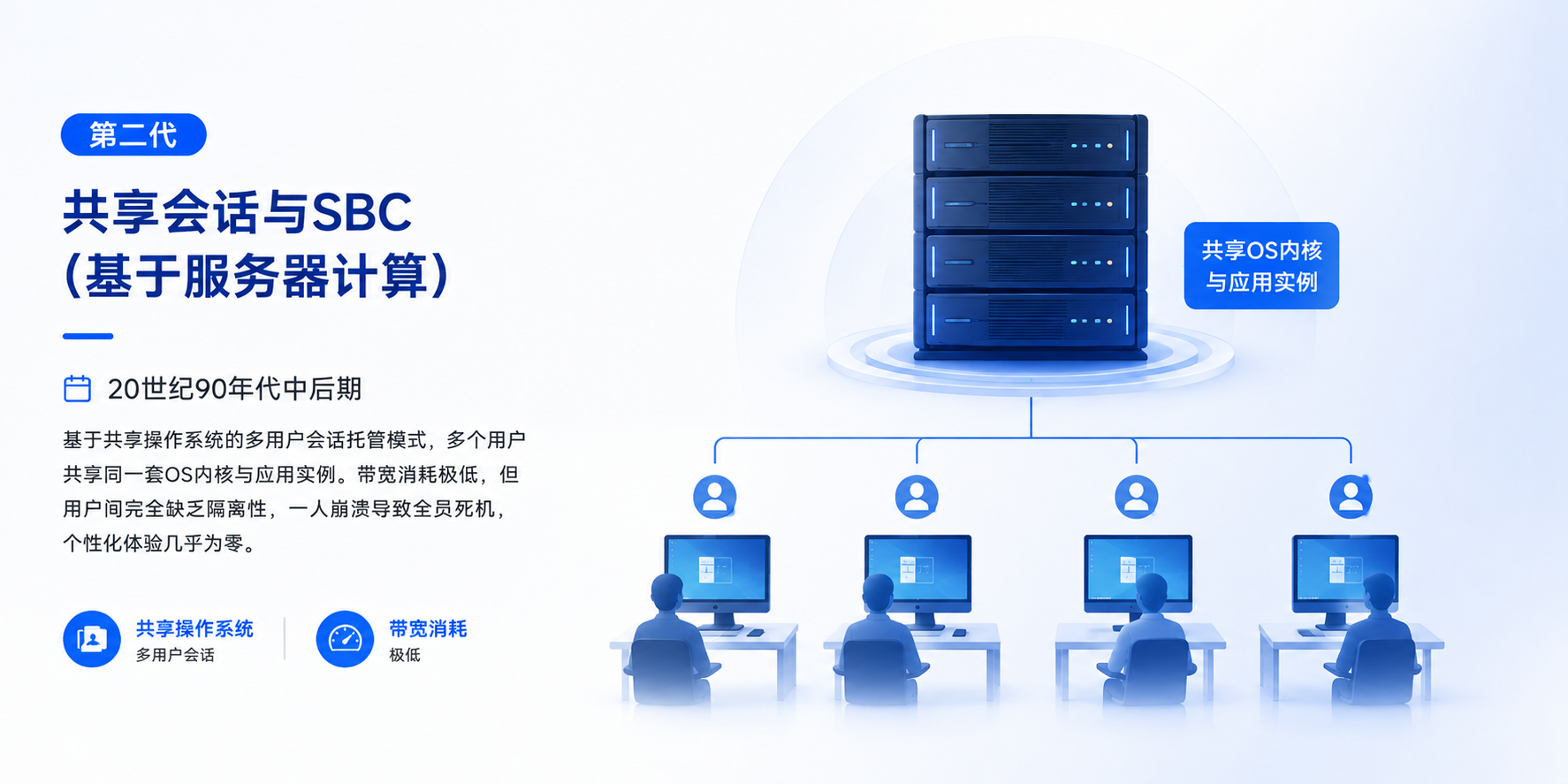
Second Generation: Shared Sessions and SBC (Server-Based Computing) — In the mid-to-late 1990s, Microsoft introduced Windows NT Terminal Server, while Citrix launched WinFrame/MetaFrame, ushering in a multi-user session hosting model based on a shared operating system. Multiple users shared the same OS kernel and application instances. This architecture significantly reduced bandwidth consumption, but its critical weakness was the lack of user-level isolation: a failure in one user's session could potentially affect other users, while support for personalized desktop experiences remained extremely limited.
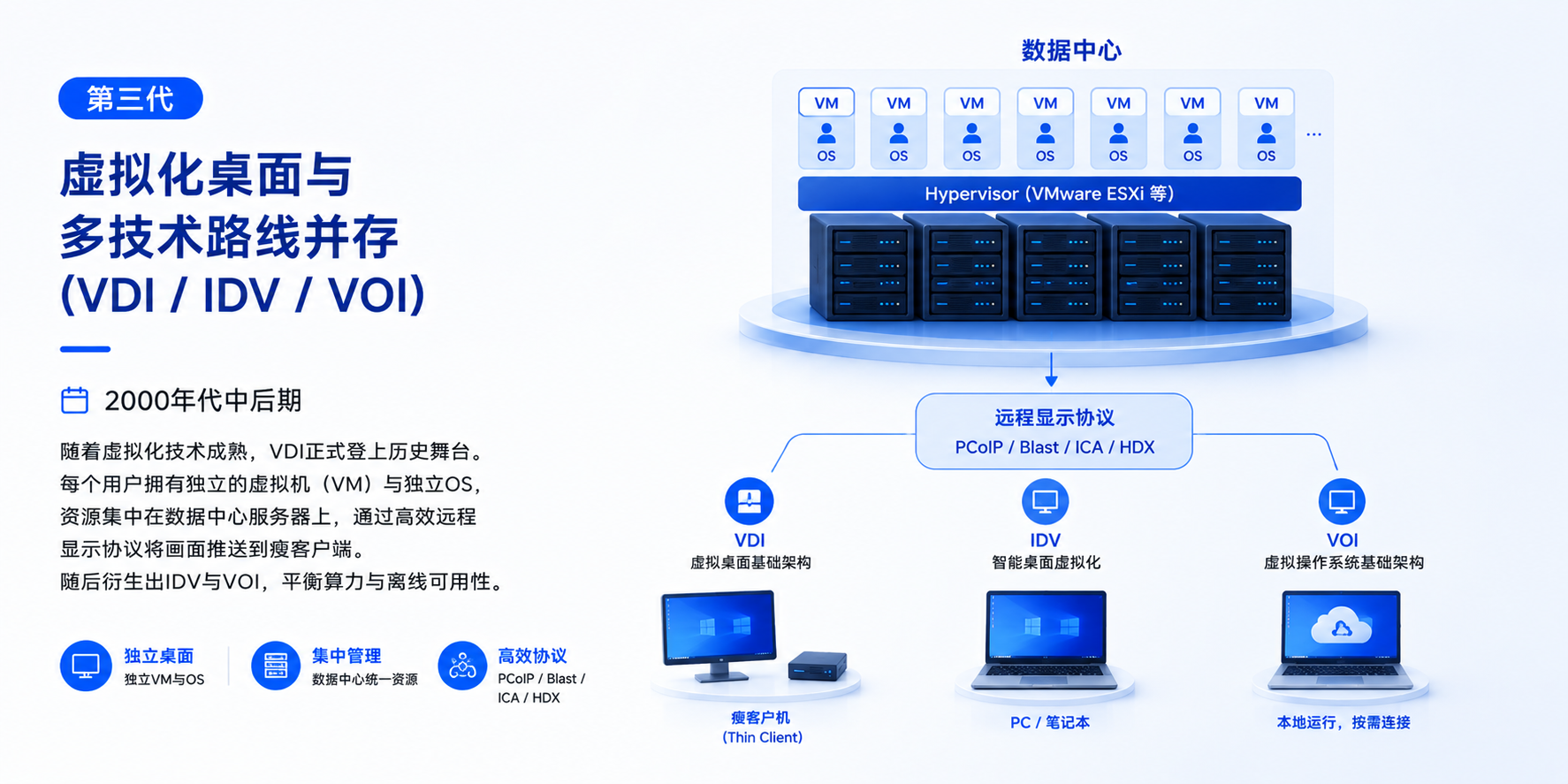
Third Generation: Virtual Desktop and the Rise of Multiple Technology Paths (VDI / IDV / VOI) — In the mid-to-late 2000s, as underlying virtualization technologies such as VMware ESXi and hypervisors matured, Virtual Desktop Infrastructure (VDI) formally emerged. Each user was assigned an independent virtual machine (VM) and operating system (OS), with computing resources centralized on data center servers. Desktop images were delivered to thin clients through high-performance remote display protocols such as PCoIP, Blast, and ICA/HDX. Subsequently, IDV (Intelligent Desktop Virtualization) and VOI (Virtual Operating System Infrastructure) emerged as alternative approaches, seeking to strike a balance between centralized management, local computing power, and offline availability.
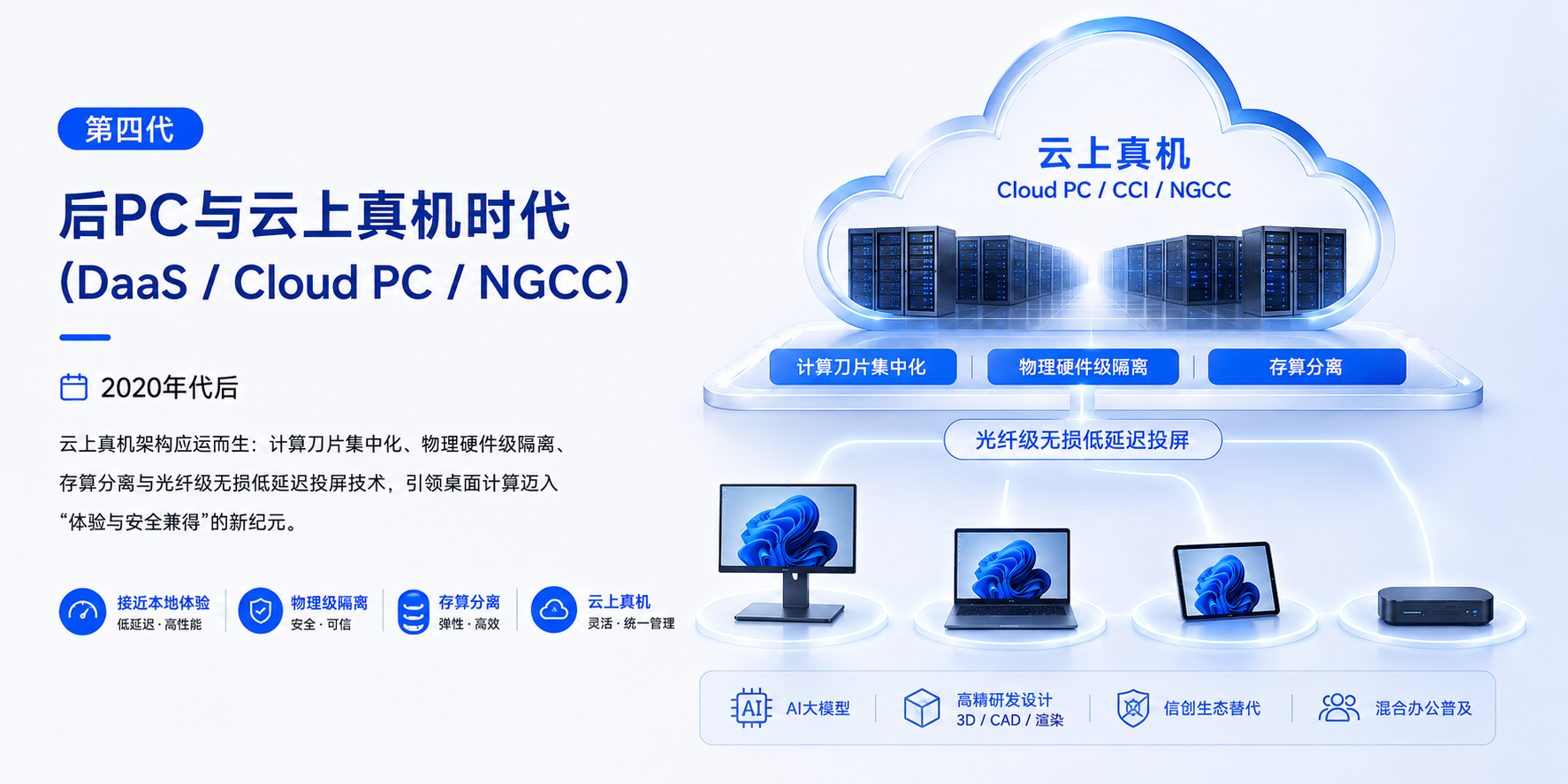
Fourth Generation: The Post-PC and Cloud-Based Physical Machine Era (DaaS / Cloud PC / NGCC) — Since the 2020s, the rise of AI foundation models, high-performance R&D and design workloads such as 3D/CAD and video rendering, the transition toward domestic IT ecosystems, and the widespread adoption of hybrid work have increasingly exposed the limitations of traditional VDI—including virtualization overhead, multimedia latency, poor peripheral compatibility, and high centralized storage and licensing costs.
The “Cloud-Based Physical Machine” (Cloud PC / CCI / NGCC) architecture has emerged in response. By combining centralized compute blades, physical hardware-level isolation, compute-storage disaggregation, and fiber-grade lossless, low-latency display transmission, it aims to deliver a new generation of desktop computing that balances high-performance user experience with security and centralized control.
1.2 Technical Analysis of Desktop Virtualization
Technology Path A: VDI (Virtual Desktop Infrastructure)
- Architecture: Computing, storage, and OS instances run centrally on data center server clusters, with Hypervisors such as KVM or ESXi used to provision and isolate virtual machines (VMs). Endpoints function primarily as display and I/O devices, transmitting keyboard/mouse inputs and receiving display streams.
- Key Advantages: Highest level of centralized management; data can be prevented from being stored locally; highly flexible desktop roaming and access.
- Key Challenges: Highly dependent on high-bandwidth, low-latency networks—network outages can render desktops inaccessible; high-concurrency Boot Storms can impact performance; vGPU licensing can become extremely costly for 3D graphics and AI-intensive workloads, with noticeable virtualization overhead.
Technology Path B: IDV (Intelligent Desktop Virtualization)
- Architecture: Centralized management with distributed computing. Cloud-based desktop images are centrally deployed and distributed, while client-side hardware runs VMs using Type-1 or Type-2 Hypervisors.
- Key Advantages: Makes full use of local PC CPU/GPU resources; supports offline operation; reduces server-side infrastructure costs.
- Key Challenges: Requires a high degree of hardware standardization across endpoint devices; peripheral compatibility through the virtualization layer can be problematic; data is generated and cached locally, creating risks associated with physical device theft and data leakage.
Technology Path C: VOI (Virtual Operating System Infrastructure)
- Architecture: Uses PXE or diskless boot technology to boot a bare-metal OS directly at the hardware layer, while cloud-based systems distribute differential image files. This eliminates virtualization overhead.
- Key Advantages: Delivers near-native local PC hardware performance with no virtualization-layer overhead and maintains strong compatibility with legacy peripherals.
- Key Challenges: Transmitting large system images across WAN environments is difficult and may create network traffic storms; data can remain on local devices; limited support for mobile working and mobile endpoint access.
Technology Path D: RDS / SBC (Remote Desktop Services / Server-Based Computing)
- Architecture: Multiple users share a Windows/Linux server through concurrent sessions, using the same operating system environment and application instances.
- Key Advantages: Extremely high user density per server, with very low hardware and licensing costs; well suited to lightweight scenarios such as call centers.
- Key Challenges: Limited personalization; poor application compatibility, as many enterprise applications do not support multi-session environments; insufficient security isolation between users.
Technology Path E: Cloud PC (CCI / Cloud-Based Physical Machines / Centralized Compute Blade Architecture)
- Architecture: Traditional PC computing components—including CPU, GPU, memory, and motherboard—are modularized into high-density physical compute blades deployed centrally in the data center, with a 1:1 dedicated hardware mapping for each user. The endpoint requires only a lightweight zero client or software client and interacts with the centralized compute blade through low-latency audio/video streaming protocols and direct USB bus passthrough.
- Key Advantages: Zero virtualization overhead, trusted architecture, and data kept off the endpoint; physical cross-network collaboration between dual compute blades; combines physical isolation with high-performance productivity. Simplified operations through five one-click functions: restore, install, wipe, replace, and assign. Hardware failures can be addressed through rapid hot replacement. It can also reduce energy consumption and avoid additional costs associated with expensive centralized virtualization and vGPU software licensing.
- Key Challenges: Because computing resources are physically dedicated on a 1:1 basis, Cloud PC may have lower deployment density and higher initial investment than traditional VDI with VM overcommitment for lightweight workloads such as text entry. Expansion requires purchasing and installing additional physical blade modules, resulting in less elasticity and agility.
II. Comparison of Mainstream Architectures
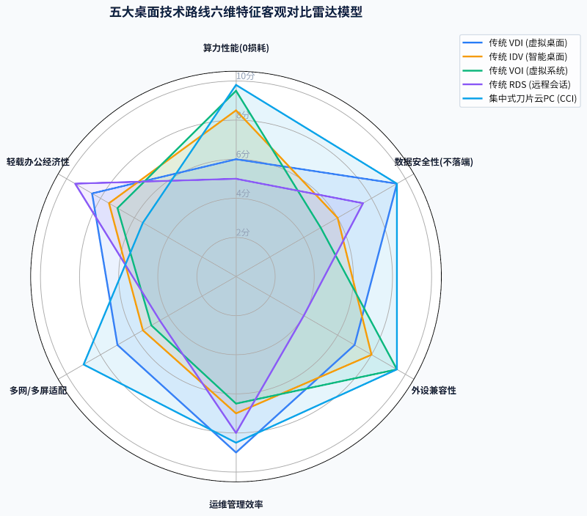
Architecture Comparison
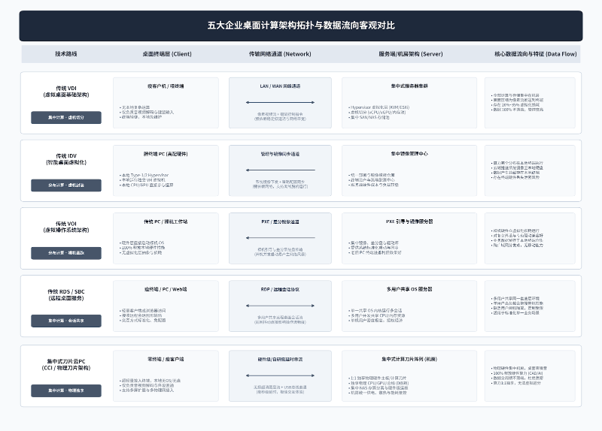
Feature Comparison
III. Enterprise Desktop Cloud Selection Guide & Decision Model
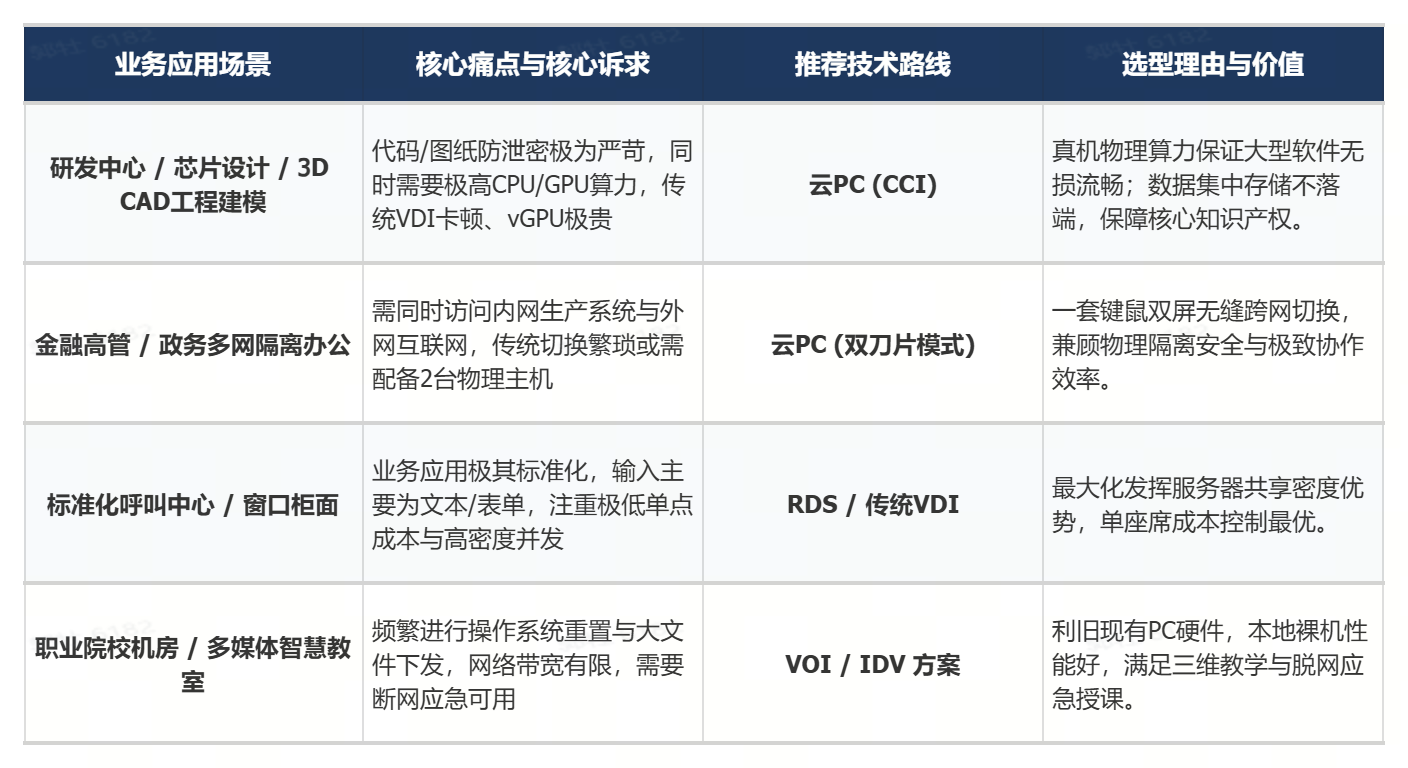
When upgrading desktop infrastructure, enterprises should avoid pursuing a single technology or metric in isolation. Instead, they should assess four key dimensions—computing requirements, security and confidentiality, network conditions, and O&M budget—and select the most appropriate architecture based on specific business scenarios.
The core decision logic can be summarized as:
Workload → Security Level → Network Conditions → TCO & O&M → Technology Selection
This enables enterprises to move from “technology-driven selection” to “business- and scenario-driven selection,” achieving the optimal balance between performance, security, user experience, manageability, and total cost of ownership (TCO).